How we added the blog and living updates
This post is more than an update note. It is a working sample for future publications: frontmatter, illustrations, a Mermaid diagram, a LaTeX formula, and a reusable structure.
What changed
We added two layers on top of the static portfolio:
- a notification center on the landing page;
- a dedicated blog section with markdown sources and an asset directory.
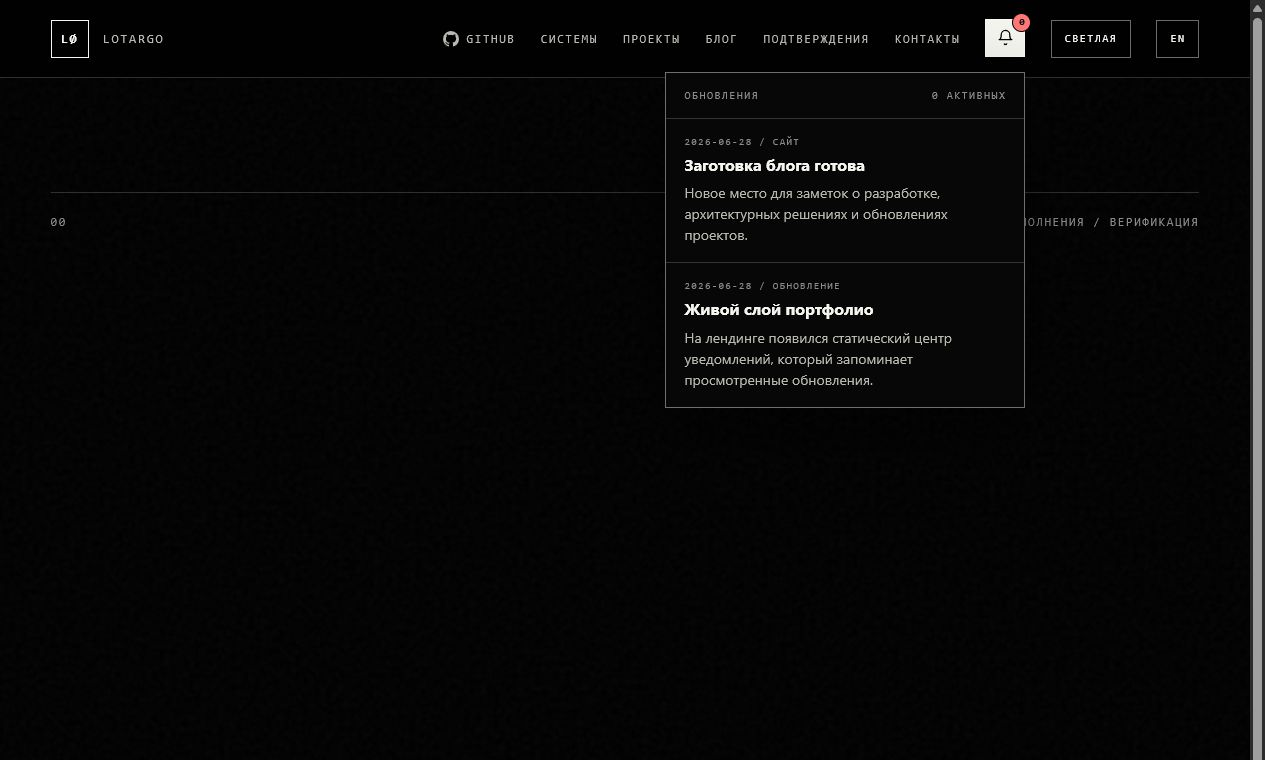
The notifications are still static, but they feel like a living part of the site. The data lives in assets/js/notifications.js, and viewed items are remembered with localStorage.
Why no admin panel
A protected admin panel for GitHub Pages would require authentication, file uploads, repository writes, and separate deployment logic. For this site, a local publishing workflow is simpler and more reliable:
This keeps the site fully static while leaving room for a future markdown → HTML generator.
Blog structure
blog/
  index.html
  posts/
    blog-launch.html
  content/
    blog-launch.ru.md
    blog-launch.en.md
  assets/
    landing-notifications.png
    blog-index.png
Markdown files are the source. HTML pages are what visitors read. This structure works well with GitHub Pages, keeps the site's visual language consistent, and leaves a clean path for automation later.
LaTeX example
Technical notes benefit from formulas. For example, the publishing cost can be described as:
The point is simple: publishing should stay inexpensive in effort, otherwise the blog will stop being updated.
What to copy for the next post
For the next post, reuse this pattern:
- Create
*.ru.mdand*.en.md. - Put images in
blog/assets/. - Preview the page locally.
- Commit the finished version.
A static site does not have to feel frozen. When it has dates, updates, notes, and a clear publishing process, it already feels like a working product.
Как мы добавили блог и живые уведомления
Этот пост — не просто запись об обновлении сайта. Он нужен как рабочий образец для будущих публикаций: с frontmatter, иллюстрациями, Mermaid-диаграммой, LaTeX-формулой и понятной структурой.
Что изменилось
Мы добавили два слоя поверх статического портфолио:
- центр уведомлений на главной странице;
- отдельный раздел блога с markdown-исходниками и папкой для ассетов.
Уведомления остаются статическими, но воспринимаются как живая часть сайта. Данные лежат в assets/js/notifications.js, а просмотренные записи запоминаются через localStorage.
Почему без админки
Защищённая админка для GitHub Pages потребовала бы авторизацию, загрузку файлов, запись в репозиторий и отдельную логику деплоя. Для текущего сайта проще и надёжнее локальный publishing workflow:
Такой путь оставляет сайт полностью статическим, но не мешает постепенно добавлять генератор markdown → HTML.
Как устроен блог
blog/
  index.html
  posts/
    blog-launch.html
  content/
    blog-launch.ru.md
    blog-launch.en.md
  assets/
    landing-notifications.png
blog-index.pngMarkdown-файлы — это источник. HTML-страницы — то, что читает посетитель. Такая схема хорошо работает с GitHub Pages, сохраняет общий визуальный язык сайта и даёт место для будущей автоматизации.
Пример LaTeX
Для технических заметок полезно иметь формулы. Например, оценку стоимости публикации можно записать так:
Смысл простой: публикация должна оставаться дешёвой по усилиям, иначе блог быстро перестанет обновляться.
Что брать как шаблон
Для следующего поста достаточно скопировать этот подход:
- Создать
*.ru.mdи*.en.md. - Положить изображения в
blog/assets/. - Проверить страницу локально.
- Закоммитить готовую версию.
Статический сайт не обязан быть мёртвым. Если у него есть даты, обновления, заметки и понятный процесс публикации, он уже ощущается как работающий продукт.